Sometimes you earn money without sending an invoice. For example, as a musician, you might sell a record of your music without sending an invoice. For instance, a cash transaction after a concert you've performed.
If you have such income, you must include it in your records. Besides that, you must also pay VAT on it as you normally would. You can easily do this within Gekko by entering a 'Correction'.
For example, if you've made €200 in revenue without sending an invoice, you need to enter this amount by creating a correction.
Making a correction for revenue without an invoice
1. Go to your invoice overview;
2. Click on 'upload.;
3. Click on 'Correction' (see Image A);
4. Enter the amount of your revenue;
5. Select the VAT percentage you need to pay;
6. Provide a relevant description (e.g. "Record sales Q1 2026") and upload your correction.
The amount of your revenue is now in your account as a 'correction' and can be included in your VAT return (see Image B).
Image A. Example correction tool
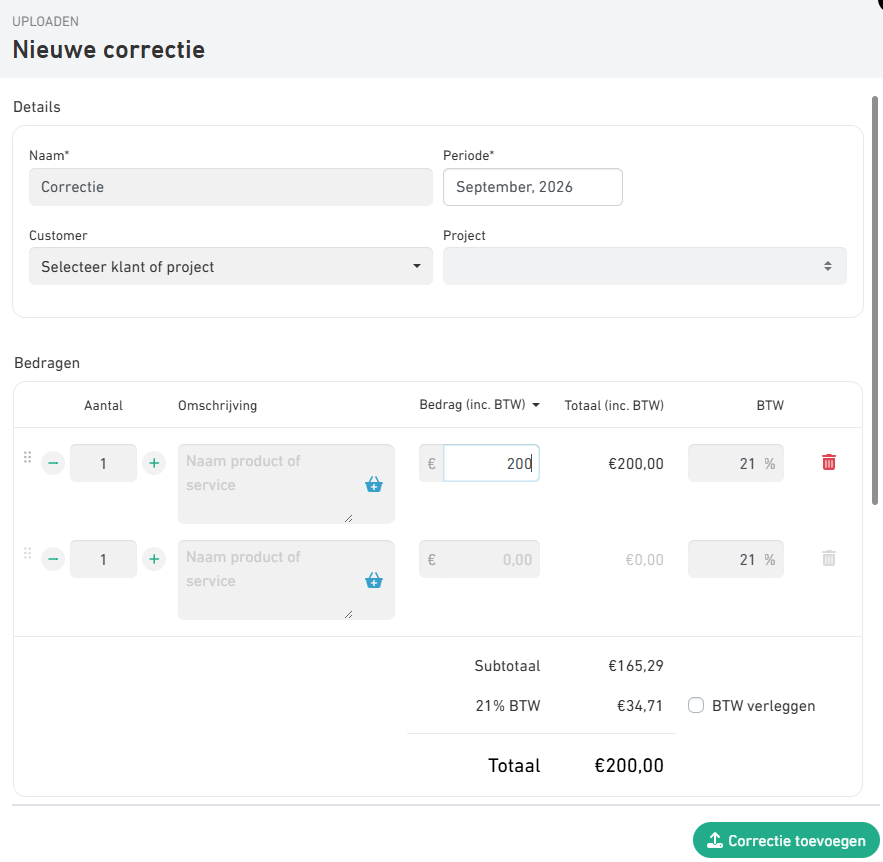
Image B. Example invoice overview with label 'correction'

Was this article helpful?
That’s Great!
Thank you for your feedback
Sorry! We couldn't be helpful
Thank you for your feedback
Feedback sent
We appreciate your effort and will try to fix the article